
Last updated on
Oct 21, 2026

Get the free Ohio Medicaid Pharmacy Prior Authorization Request Form
We are not affiliated with any brand or entity on this form

Fill out
Complete the form online in a simple drag-and-drop editor.

eSign
Add your legally binding signature or send the form for signing.

Share
Share the form via a link, letting anyone fill it out from any device.

Export
Download, print, email, or move the form to your cloud storage.
Why pdfFiller is the best tool for your documents and forms


End-to-end document management
From editing and signing to collaboration and tracking, pdfFiller has everything you need to get your documents done quickly and efficiently.
Accessible from anywhere
pdfFiller is fully cloud-based. This means you can edit, sign, and share documents from anywhere using your computer, smartphone, or tablet.
Secure and compliant
pdfFiller lets you securely manage documents following global laws like ESIGN, CCPA, and GDPR. It's also HIPAA and SOC 2 compliant.
What is Ohio Medicaid Pharmacy Form
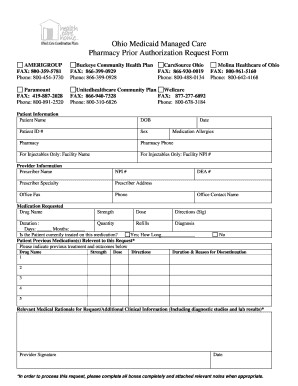
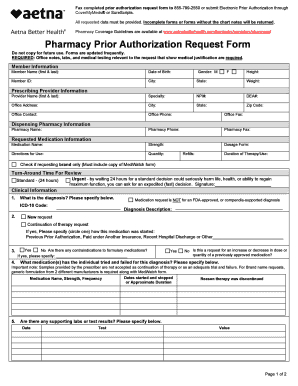
The Ohio Medicaid Pharmacy Prior Authorization Request Form is a healthcare document used by providers to request prior authorization for Medicaid-covered medications.
pdfFiller scores top ratings on review platforms




Who needs Ohio Medicaid Pharmacy Form?
Explore how professionals across industries use pdfFiller.

Ohio Medicaid Pharmacy Form is needed by:
-
Healthcare Providers in Ohio
-
Medicaid Managed Care Organizations
-
Pharmacists handling prior authorization requests
-
Patients seeking medication approvals
-
Medical Administrators processing healthcare paperwork
Comprehensive Guide to Ohio Medicaid Pharmacy Form
What is the Ohio Medicaid Pharmacy Prior Authorization Request Form?
The Ohio Medicaid Pharmacy Prior Authorization Request Form is an essential document used by healthcare providers to seek approval for prescribed medications under Medicaid. This form plays a critical role in the Medicaid system, ensuring that medications are medically necessary before coverage is granted. For healthcare providers in Ohio, understanding the purpose of this form is crucial for optimizing patient care.
When using the form, providers must include various details, including patient information, specific medications, and related health information. Accurate submission of these details facilitates timely approvals, aligning treatments with patient needs and Medicaid requirements.
Purpose and Benefits of the Ohio Medicaid Pharmacy Prior Authorization Request Form
The necessity of the Ohio Medicaid Pharmacy Prior Authorization Request Form stems from its role in verifying that prescribed medications are medically necessary. By requiring prior authorization, the form ensures that patient treatments align with their Medicaid plans, ultimately enhancing patient care.
Using this form helps to streamline the medication approval process, reducing delays in treatment and ensuring an efficient pathway for healthcare providers to facilitate necessary therapies for their patients. Furthermore, it provides a framework for aligning prescribed therapies with patient Medicaid terms.
Who Needs to Complete the Ohio Medicaid Pharmacy Prior Authorization Request Form?
Completion of the Ohio Medicaid Pharmacy Prior Authorization Request Form is a responsibility shared between healthcare providers and patients. Healthcare providers must fill out and sign the form, providing essential information regarding the patient's medication needs.
Patients who need medications covered under their Medicaid plan also play a crucial role in this process. It's important for providers to understand their roles in ensuring that all required information is accurately provided, thus facilitating a smoother approval process.
How to Fill Out the Ohio Medicaid Pharmacy Prior Authorization Request Form Online
To fill out the Ohio Medicaid Pharmacy Prior Authorization Request Form online, follow these steps:
-
Gather necessary information such as patient history and prescription details.
-
Access the form using pdfFiller to complete it seamlessly online.
-
Input patient and medication details carefully, ensuring accuracy in every field.
-
Review the form for completeness before submitting it.
Accuracy is vital, particularly in high-stakes sections like diagnosis and medication specifics, as this contributes to the form's approval status.
Field-by-Field Instructions for the Ohio Medicaid Pharmacy Prior Authorization Request Form
Understanding each section of the Ohio Medicaid Pharmacy Prior Authorization Request Form is essential for successful submission. Key areas include:
-
Patient fields where you provide essential details like the patient's name, date of birth, and current medications.
-
Prescriber information, including the healthcare provider's name and required signature.
-
Medical rationale and medication history, which are crucial for justifying the need for the prescribed medications.
Each field requires careful attention to ensure it is filled out correctly, which can significantly impact the outcome of the authorization request.
Submission Methods for the Ohio Medicaid Pharmacy Prior Authorization Request Form
Submitting the Ohio Medicaid Pharmacy Prior Authorization Request Form can be done through several methods. Options include:
-
Mailing the completed form to the appropriate Medicaid office.
-
Filing it via fax to ensure rapid transmission.
-
Utilizing pdfFiller for online submission to expedite the process.
After submitting, it is critical to confirm the receipt of your submission, as this ensures that the request has been processed correctly and meets any state-specific requirements.
What Happens After You Submit the Ohio Medicaid Pharmacy Prior Authorization Request Form?
Upon submission of the Ohio Medicaid Pharmacy Prior Authorization Request Form, providers can expect a processing time determined by the Medicaid office. During this period, they can check the status of their application to stay informed of any updates.
Potential outcomes of the submission can include approval, denial, or requests for additional information. In case of denial, understanding the next steps—such as providing further documentation or addressing rejection reasons—is essential for improving chances of future approval.
Security and Compliance for Handling the Ohio Medicaid Pharmacy Prior Authorization Request Form
When using pdfFiller to manage the Ohio Medicaid Pharmacy Prior Authorization Request Form, users can be assured of robust security measures. pdfFiller adheres to HIPAA regulations and employs encryption to protect sensitive patient information.
Safeguarding data integrity is paramount. As such, pdfFiller ensures that all document handling aligns with established data protection standards, giving users peace of mind when submitting potentially sensitive information.
Why Choose pdfFiller for Your Ohio Medicaid Pharmacy Prior Authorization Request Form?
pdfFiller offers a user-friendly interface that makes filling out and signing the Ohio Medicaid Pharmacy Prior Authorization Request Form straightforward. With the capability to access forms from any browser, users can avoid cumbersome downloads and manage documentation efficiently.
The platform also provides comprehensive features for editing and sharing, making it an ideal solution for both physicians and administrative staff managing medication authorizations.
Final Steps to Take Advantage of pdfFiller for Your Medication Authorization Needs
Now is the time to start leveraging pdfFiller to manage your Ohio Medicaid Pharmacy Prior Authorization Request Form efficiently. Transitioning to a digital form-filling solution allows for streamlined processes, driving efficiency in securing necessary medication approvals.
Explore additional resources and templates available on pdfFiller to enhance your experience in managing Medicaid forms effectively.
How to fill out the Ohio Medicaid Pharmacy Form
-
1.Access the Ohio Medicaid Pharmacy Prior Authorization Request Form by navigating to pdfFiller's website and using the search function to find the specific form.
-
2.Once located, open the form in pdfFiller’s editor. Familiarize yourself with the interface, noting areas to enter information and any navigation tools available.
-
3.Before filling out the form, gather all necessary patient information, including the patient's name, date of birth, medication details, and provider information, ensuring accuracy to avoid delays.
-
4.Begin filling in the fields systematically. Enter the patient's details in the designated blanks and provide information about the prescribed medication, such as drug name, strength, and dosage.
-
5.Use checkboxes where applicable for yes/no responses. For the pivotal questions regarding current treatment and diagnosis, ensure to provide clear, concise answers.
-
6.Once all sections of the form are completed, review the information for accuracy. Make sure all required fields are filled, following the guidelines of the Medicaid requirements.
-
7.After thorough review, finalize the form by applying your electronic signature in the designated section. Verify that this section is correctly filled out with the provider’s name and date.
-
8.To save your work, click on the 'Save' option within pdfFiller, and choose to download the completed form as a PDF or submit it directly through the platform if submission options are available.

Who is eligible to use the Ohio Medicaid Pharmacy Prior Authorization Request Form?
Healthcare providers who are enrolled in Ohio's Medicaid program and wish to request medication authorizations for their patients are eligible to use this form.
What information is required when completing the form?
You need to provide patient information including name and date of birth, medication details like drug name and dosage, as well as relevant clinical information justifying the medication request.
How do I submit the completed form?
Once the form is filled out on pdfFiller, you can submit it directly through the platform if the feature is available, or download it to submit via mail or email to the appropriate Medicaid authority.
Are there deadlines for submitting the prior authorization request?
Yes, timely submission is crucial as there may be specific deadlines based on medication needs and patient treatment plans. It is advisable to submit as soon as possible.
What are common mistakes to avoid when completing this form?
Common mistakes include incomplete patient details, missing provider signatures, and failing to include necessary medical rationale for the medication request.
What is the usual processing time for prior authorization requests?
Processing times can vary, but typically it may take several days to a couple of weeks. It’s important to check with the Medicaid office for exact timelines.
Can I edit the form after saving it on pdfFiller?
Yes, pdfFiller allows you to edit the form after saving it. Simply open the saved document to make the necessary changes before finalizing it for submission.
Related Content
Related Forms




Get the latest insights from our blog


If you believe that this page should be taken down, please follow our DMCA take down process
here
.
This form may include fields for payment information. Data entered in these fields is not covered by PCI DSS compliance.